
Builder Changed Layout Without Consent in Navi Mumbai
If a builder changed layout without consent, do not pay more money until you verify the approved plan, revised plan, MahaRERA records, authority approval, agreement terms, and land records. Under RERA, major changes in sanctioned plans, layout plans, buildings, or common areas generally require proper approval and consent where applicable. Verify the facts before transaction with a property lawyer or the relevant authority.
What Counts as a Layout Change?
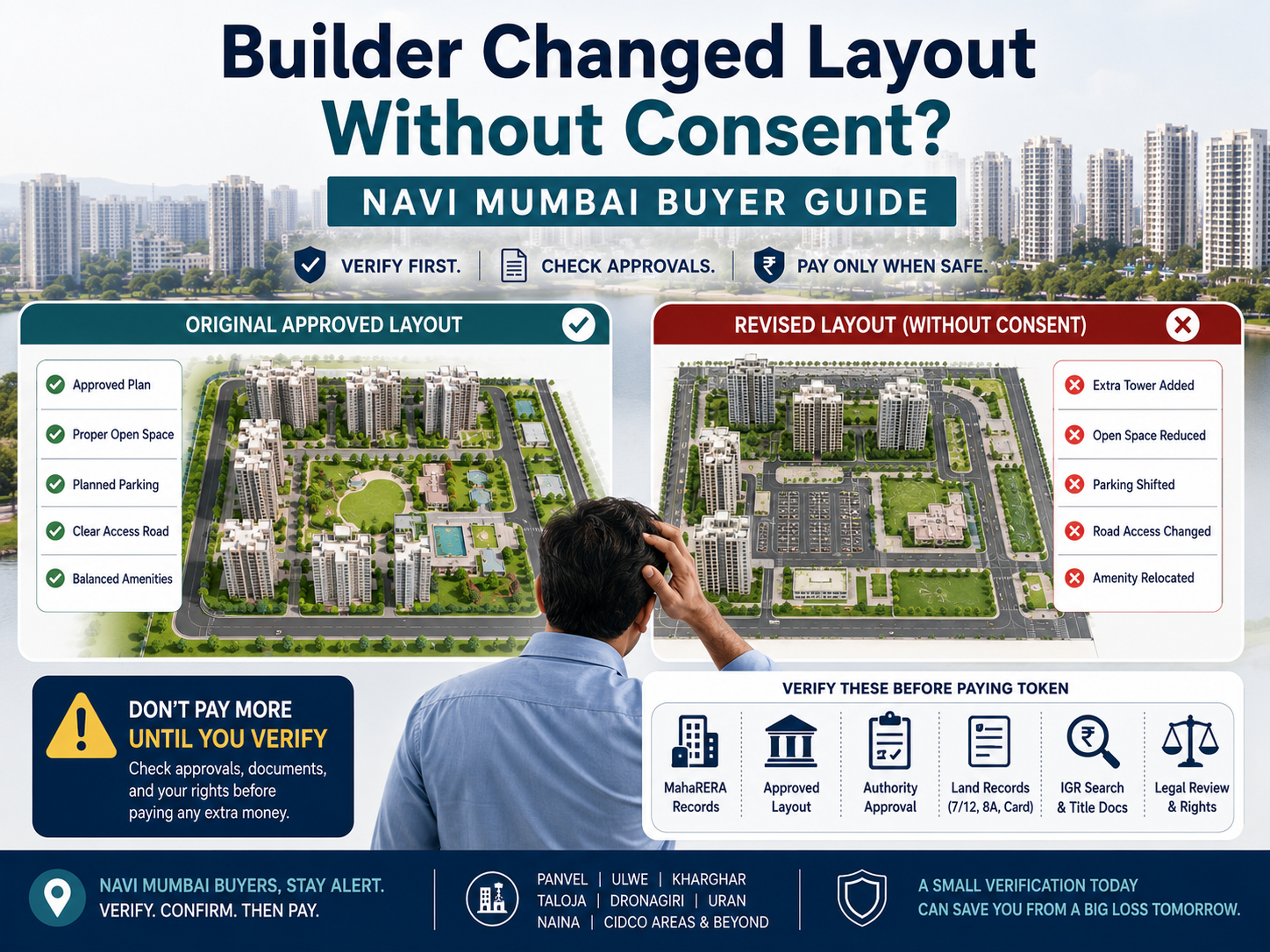
A layout change means the builder is no longer showing the same approved plan, plot arrangement, building position, common area, amenity plan, parking layout, road access, or project structure that was originally shown to the buyer.
Not every small change is automatically illegal. But some changes are serious.
| Change type | Why it matters |
|---|---|
| Flat or unit location changed | Your promised unit, wing, floor, view, or access may change |
| Parking location changed | Mechanical/open/stilt/basement parking rights may be affected |
| Garden, clubhouse, open space shifted | Common-area value may reduce |
| Extra tower or extra floor added | Density, sunlight, amenities, and approvals may change |
| Road width or access changed | Entry, exit, fire access, and resale value may be affected |
| Plot number or survey number changed | Title, land identity, and approvals may not match |
| Layout changed in NAINA/CIDCO area | Authority approval and survey/gat number verification become critical |
| Layout near creek, CRZ, mangrove, or green zone changed | Zoning and environmental risk may exist |
For a buyer, the real question is simple: Was the revised layout approved, disclosed, and legally valid for this project?
If the answer is not clear, pause.
Also read: Builder Fraud Guide Navi Mumbai
What RERA Says About Layout Changes
RERA requires the promoter to develop the project according to sanctioned plans, layout plans, and approved specifications.
MahaRERA guidance states that major alterations or additions in sanctioned plans, layout plans, building specifications, or common areas require written consent of at least two-thirds of the allottees where Section 14(2) applies.
This does not mean every small internal change needs the same process. Minor architectural or structural changes may be treated differently depending on facts, approvals, and the agreement.
But if the change affects your booked flat, plot, common area, parking, tower, open space, floor count, building position, or project layout, treat it as a serious issue.
Ask these questions:
| Question | Why it matters |
|---|---|
| Is this the same layout uploaded on MahaRERA? | Builder sales PDF may differ from official documents |
| Is the revised layout sanctioned by the authority? | Unapproved revised plans create risk |
| Was buyer consent required? | Major changes may need allottee consent |
| Does it affect your unit or common area? | Your agreement value may be impacted |
| Is the change reflected in the agreement for sale? | Future dispute depends heavily on written documents |
Do not rely only on brochure, WhatsApp layout, or verbal assurance.
Why Navi Mumbai Buyers Must Be Careful
Layout-change risk is higher in areas where land, planning authority, and approvals are complex.
This includes Panvel, Ulwe, Kharghar, Taloja, Dronagiri, Uran, Raigad belt, Thane-side extensions, NAINA villages, CIDCO leasehold areas, gaothan areas, and locations near creeks or coastal zones.
CIDCO and NAINA checks
In NAINA areas, CIDCO functions as the Special Planning Authority for many planning permissions. A buyer should check whether the project details match the official file.
Match these fields:
| Field | What to compare |
|---|---|
| Village name | Same as layout, 7/12, and approval |
| Survey number / Gat number | Same across land record and authority approval |
| File number / BP number | Same on CC and approved plan |
| Applicant / developer name | Same as builder or landowner arrangement |
| Architect name | Should match submitted plan documents |
| Building type | Residential, plotted, mixed-use, township, etc. |
| Approval date | Check if the plan is old, revised, or superseded |
Land-record checks
For land or plotted development, check 7/12, 8A, mutation entries, property card where applicable, and survey/gat numbers.
Plain English meanings:
| Marathi / land-record term | Meaning |
|---|---|
| 7/12 Utara | Rural land record showing owner/holder, area, use, crop, and other rights |
| 8A Utara | Village account extract showing landholding details |
| Ferfar / Mutation | Change entry in revenue record after sale, inheritance, partition, etc. |
| Boja | Charge, loan, or liability entry in the “other rights” column |
| Gat number / Survey number | Land identification number |
| Property card | Urban land record, especially in city survey areas |
These documents support verification. They should not be treated as final proof of clean ownership without title search and legal review.
Also read: Title Fraud Property Guide
CRZ and coastal risk
For Dronagiri, Uran, creek-side locations, mangrove-adjacent plots, and coastal Raigad/Thane belts, check whether CRZ/CZMP restrictions may affect the land.
If the layout has been changed to move buildings, roads, open spaces, or plot boundaries near sensitive coastal areas, get professional verification.
Also read: NAINA Plot Fraud Guide
Documents to Check Before Accepting the Revised Layout
Ask the builder for documents in writing.
| Document | What to check |
|---|---|
| Original sanctioned layout | What was first approved |
| Revised sanctioned layout | Whether the new plan is officially approved |
| Commencement Certificate | Whether construction permission matches the revised plan |
| MahaRERA project page | Uploaded plans, approvals, title report, encumbrance declaration |
| Agreement for sale | Whether layout, unit, carpet area, parking, and amenities match |
| Allotment letter | What was promised at booking |
| Architect certificate | Whether revision is certified |
| CIDCO/NAINA approval | File number, village, survey number, CC, building type |
| 7/12, 8A, property card | Land identity and revenue entries |
| Mutation / Ferfar status | Whether ownership/transfer entries are updated |
| IGR search / Index II | Registered sale deed, development agreement, mortgage, POA, etc. |
| CRZ/CZMP check | Coastal, creek, mangrove, or CRZ impact |
| Written builder explanation | Why the layout changed and who approved it |
If the builder refuses to share approved revised documents, do not treat the new layout as safe.
What to Check Before Paying Token Money

Before paying token money, check these points.
| Check | Stop if… |
|---|---|
| MahaRERA project details | Project is not found, expired, mismatched, or documents are missing |
| Approved layout | Builder shows a revised PDF without approval stamp |
| Unit/plot identity | Flat, plot, wing, tower, or parking changed |
| Land records | Survey/gat number does not match layout |
| IGR records | Development agreement, POA, or mortgage is not disclosed |
| CIDCO/NAINA file | File number or village/survey number does not match |
| CRZ/zoning | Land may fall near restricted coastal/green/no-development area |
| Agreement draft | Broad clauses allow builder to change everything |
| Payment demand | Builder wants cash or heavy token without documents |
Under RERA, a promoter cannot take more than the permitted advance amount before entering into a registered agreement for sale, subject to the project and facts. Take legal advice if the builder demands a large token or advance.
Also read: Token Amount Fraud Guide
—
Red Flags
Treat these as warning signals:
- Builder says, “Approval will come later.”
- Layout on brochure differs from MahaRERA uploads.
- Revised layout has no authority stamp.
- Builder refuses to give old and new approved plans.
- Plot number changed after token discussion.
- Open space, clubhouse, garden, or internal road is reduced or shifted.
- Parking shown earlier is no longer available.
- Survey number on plan differs from 7/12 or property card.
- NAINA/CIDCO file details do not match the builder’s claim.
- Builder asks for cash token.
- Agreement says builder can change layout without meaningful limitation.
- Land is near creek, mangrove, CRZ, green zone, or no-development zone, but builder gives only verbal assurance.
- Broker says, “Everyone buys like this.”
One mismatch is enough to pause payment.
—
How to Verify a Layout Change
Step 1: Collect both layouts
Ask for the original layout shown at booking and the revised sanctioned layout.
Do not accept only a brochure image.
Step 2: Check MahaRERA
Search the project on MahaRERA. Check:
- registration number
- project status
- uploaded layout approval
- commencement certificate
- legal title report
- encumbrance details
- agreement format
- correction or revision details
- complaints or orders, if visible
Step 3: Match CIDCO / NAINA approval
For NAINA or CIDCO-area projects, compare the file number, village, survey number, applicant name, architect, date, and building type.
Step 4: Check land records
Use 7/12, 8A, mutation status, property card, and survey/gat number checks to verify whether the layout refers to the same land.
Step 5: Check IGR records
Use IGR Maharashtra search to check registered documents such as sale deed, development agreement, power of attorney, mortgage, or assignment.
Step 6: Check CRZ / zoning if relevant
For creek, mangrove, coastal, Uran, Dronagiri, or Raigad-side properties, check CZMP/CRZ relevance.
Step 7: Ask the builder in writing
Ask:
> Please provide the original sanctioned layout, revised sanctioned layout, approval letter, MahaRERA update, and confirmation that the change does not affect my flat/plot/common area/parking/amenity rights. >
Step 8: Consult a professional
Use a property lawyer, architect/planner, or document-verification consultant if any document does not match.
Also read: Property Document Verification Navi Mumbai
Example: NAINA Plot Buyer Near Panvel
A buyer is shown Plot No. 18 in a NAINA-area layout near Panvel. Before token payment, the builder sends a revised layout. The internal road has shifted, open space has moved, and plot numbers look different.
The buyer should not rely on the revised PDF alone.
They should compare:
- village name
- survey/gat number
- plot number
- CIDCO/NAINA BP or CC file
- sanctioned layout
- 7/12 and mutation entry
- IGR registered documents
- MahaRERA registration, if applicable
- zoning or CRZ relevance, if nearby
If the builder cannot show approved revised documents, the buyer should pause payment and verify before transaction.
—
1. Trusting brochure layout instead of sanctioned layout. 2. Paying token money before checking MahaRERA. 3. Checking only RERA number, not uploaded documents. 4. Ignoring 7/12, property card, and mutation entries. 5. Not matching survey/gat number with layout. 6. Ignoring CIDCO/NAINA file details. 7. Accepting verbal confirmation from broker or sales staff. 8. Signing broad consent clauses without legal review. 9. Assuming “CIDCO area” means every document is safe. 10. Waiting too long before objecting in writing.
The biggest mistake is simple: paying first and verifying later.
Complaint and Remedy Options
If the builder changed the layout without proper approval or consent, your next step depends on facts.
Start with written objection. Email the builder and attach documents, screenshots, payment receipts, brochure copy, booking form, allotment letter, and agreement draft.
Possible routes may include:
- MahaRERA complaint
- MahaRERA conciliation
- consumer complaint
- legal notice
- civil remedy
- complaint to planning authority
- revenue-office verification
- police complaint in fraud-like cases
Do not choose the remedy blindly. A lawyer should check the agreement, project status, approvals, payment trail, and communication record.
Also read: Consumer Court Property Complaint Guide
—
When to Consult a Professional
Consult a professional before paying more if:
- layout changed after booking
- token money is already paid
- builder refuses stamped approvals
- parking/common area/amenity is affected
- survey number or plot number changed
- project is in NAINA, gaothan, CRZ, green zone, or coastal area
- land records show pending mutation or boja
- IGR search shows undisclosed transaction
- you are an NRI or remote buyer
- amount at risk is large
A ₹5,000–₹25,000 verification can protect a much larger loss.
convocation
Before paying token money for any Navi Mumbai, CIDCO, NAINA, gaothan, or coastal-belt property, verify the approved layout, RERA details, land records, IGR documents, and authority approvals.
Next step: read Property Document Verification Navi Mumbai before making payment.
FAQs
Frequently Asked Questions